In this section we will show how a appeal document can be accessed using an appeal code.
¶ API endpoints
In order to access the appeal documents we will be using two API endpoints namely appeal and appeal_documents. We use an appeal code (alphanumeric code) as an input parameter to extract the data of appeals submitted by the Red Cross society in a country related to a country cluster.
From the appeals data we have to extract the appeal ID stored in the variable named aid. It contains a unique identifier of the appeal provided by the Apple system. The extracted unique identifier of the appeal is later used as an input parameter in the appeal_documents endpoint to fetch the related appeal documents in a table.
The table will contain URLs of appeal documents which can be used to download the reports associated with an appeal made for a disaster in a pdf format.
In this example , the data associated with the API endpoints has been accessed using PowerBI/ Microsoft Excel and python. So our URLs for this specific example would look like this:
https://goadmin.ifrc.org/api/v2/appeal/?code=MDRCM002
- Here
https://goadmin.ifrc.org/api/tells PowerBI (or any other service/tool referencing the API) to connect with the GO server. All of your API calls to GO will start with this as a base URL. - The
v2/appeal/refers to the latest version of the API. There are multiple data tables within the database and project tells GO to search for the table that stores appeals data ( as opposed to say deployments. Seehttps://goadmin.ifrc.org/api-docs/swagger-ui/to see a full list of the available API endpoints. - The
code=MDRCM002is a query parameter which provides additional information to search for the data specific to the appeal with the code “MDRCM002”.
In order to access the appeal documents the following URL is used:
https://goadmin.ifrc.org/api/v2/appeal_document/?appeal={appeal_id}
- Same as before the
https://goadmin.ifrc.org/api/tells a service/ tool referencing the API to connect withe GO server andv2/appeal/refers to the latest version of the API. - The
appeal={appeal_id}is a query parameter which provides an appeal id to search for appeal documents associated with that particular appeal id. The appeal id is extracted from the appeals dataset and used as an input parameter for searching appeal documents.
¶ Using PowerBI/ Excel
In this example we have two API endpoints namely the appeal and appeal_document. The former will be used to extract the appeal ID by providing appeal code as a search parameter. Each appeal ID is unique and is associated with a single appeal code. The extracted appeal ID is then used as a search parameter in the appeal_document API endpoint to fetch the appeal documents associated with the provided appeal ID.
We will fetch the appeal ID by using Postman application as shown below:
- Under the name of your collection click on Add a Request. To create a new collection follow the steps shown on the page Generating an API Token.
- In the main window that appears click
GET. TheGETmethod is used request data from a web server. - In the field labeled as Enter URL or paste text, type
https://goadmin.ifrc.org/api/v2/appeal/?code=MDRCM002.
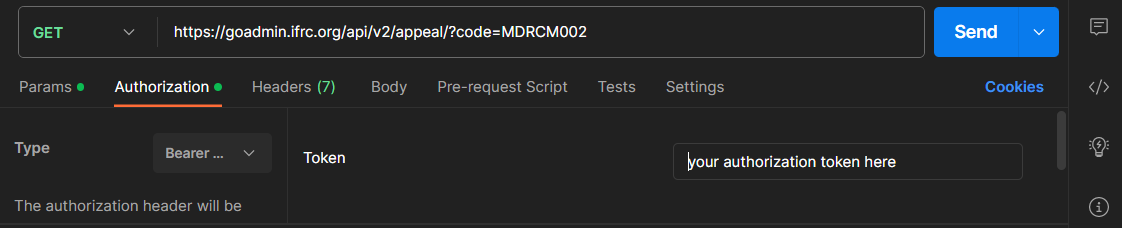
- To ensure that we are using the Authorization token, click on the Authorization option under the URL box and select Bearer Token from the drop down list.
- After selecting Bearer Token option, user can enter the authorization token in the box on the right side. To generate the API authorization token, follow the steps shown on the page
Generating an API Token. - After following the above steps, click on Send option in the top right corner. If you have entered everything correctly, then you should get the following JSON response from the server under the Body.
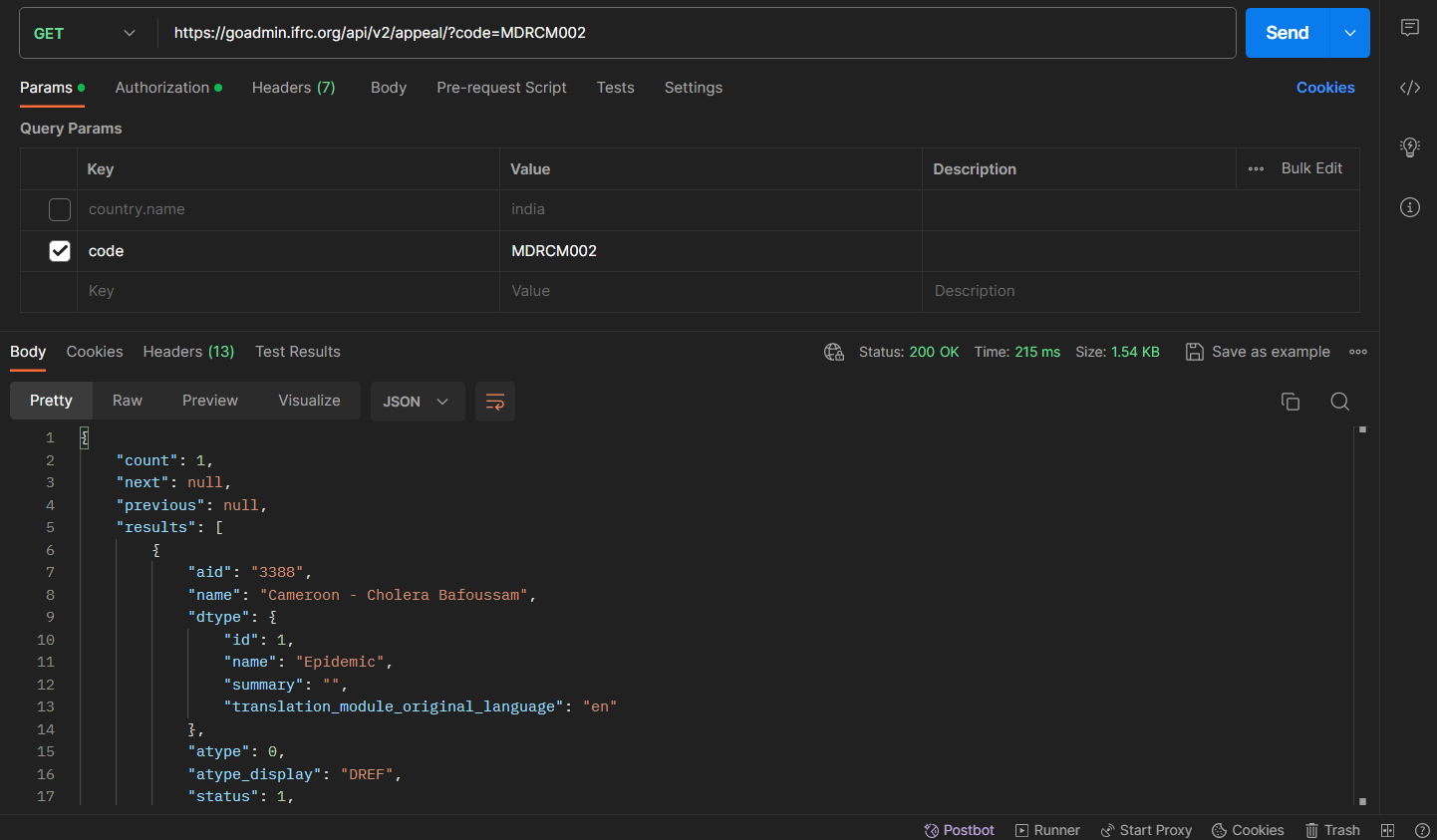
- From the response obtained, copy/save the value in front of the key named aid.
To fetch the appeal documents we can build a Query inside the Power Query editor of PowerBI or Excel by following the steps below:
- Open the Power query editor by selecting the Transform data from the top ribbon.
- Define a Parameters table which will contain the Authorization token along with a parameter named appeal_id which will be used to filter out the data.
- Under the Home ribbon, from New Source, select Blank Query. Click on Advance editor, this will open the advance query editor dialog box. In the advance editor window, paste the following code:
let
    // Get the parameter values
    ParametersTable = Parameters,
    Token = Table.SelectRows(ParametersTable, each [Column1] = "Token"){0}[Column2],

    appeal_id = Table.SelectRows(ParametersTable, each [Column1] = "appeal_id"){0}[Column2],


    BaseUrl = "https://goadmin.ifrc.org/api/v2/appeal_document/",
    PageSize = 50,  // Number of items per page

    // Construct the query based on parameter values
    filter =

        if appeal_id <> null then
            "?appeal=" & Text.From(appeal_id)
        else
            "?" ,

    GetPage = (page) =>
        let
            Url = BaseUrl & filter & "&limit=" & Text.From(PageSize) & "&offset=" & Text.From(page * PageSize),
            Headers = if Token <> null then [#"Accept-Language"="en", #"Authorization"="Bearer " & Token] else [#"Accept-Language"="en"],
            Response = Json.Document(Web.Contents(Url, [Headers=Headers])),
            Results = Response[results]
        in
            Results,

    CombineAllPages = List.Generate(
        () => [Page = 0],
        each List.Count(GetPage([Page])) > 0,
        each [Page = [Page] + 1],
        each GetPage([Page])
    ),
    #"Converted to Table" = Table.FromList(CombineAllPages, Splitter.SplitByNothing(), null, null, ExtraValues.Error),
    #"Expanded Column1" = Table.ExpandListColumn(#"Converted to Table", "Column1")
in

    #"Expanded Column1"
- After the code has been pasted in the advance editor window, click on done. A series of steps will be added in the APPLIED STEPS on the right side of the query editor window.
- After that we can expand the data by selecting the necessary columns/ fields. This can be done by clicking on the icon next to the name of the column.
- At the moment we select all the columns. This will load the data of the documents associated with the appeal ID 3378.
- Click on Close & Apply at the top of the Power Query editor window.
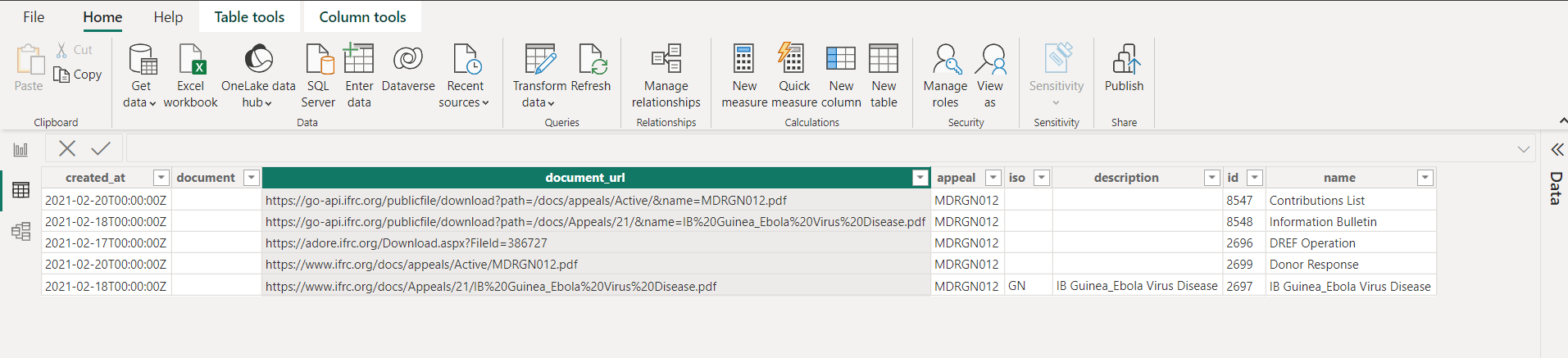
- Select the Data View option on the left side to see the data loaded. At the moment we can see only 5 appeal documents. The document's pdfs can be downloaded by using the URLs under the document_url column.
¶ Using Python
In this section we will show how the data can be accessed using python from the respective API endpoints. We will also use the API authentication token while constructing this API request.
We start the process by importing the necessary libraries used for data processing.
requests: it is a popular python library used for making HTTP requests.json: It is a python library that provides methods for dealing with JSON data. The JSON module can parse JSON from strings or files. It can convert python dictionaries or lists into JSON strings.pandas: It is a powerful library for data analysis in python.
import requests
import json
import pandas as pd
auth_token = "your_authorization_token"Next we define a function called fetch_appeal_data which fetches appeal data from the appeal API endpoint based on the provided appeal code. It then extracts the appeal ID from the API response and returns it.
def fetch_appeal_data(appeal_code):
    appeal_url = f"https://goadmin.ifrc.org/api/v2/appeal/?code={appeal_code}"
    headers = {"Authorization": f"Bearer {auth_token}"}
    appeal_response = requests.get(appeal_url, headers=headers)
    appeal_data = json.loads(appeal_response.text)
    appeal_id = appeal_data["results"][0]["aid"]
return appeal_idNext we define a function called fetch_documents_data to fetch the appeals documents data. It uses three input parameters namely appeal_id, offset and page_size to return a list of documents. The offset parameter has been used to control for the pagination of the API endpoint.
def fetch_documents_data(appeal_id, offset=0, page_size=50):
    documents_url = f"https://goadmin.ifrc.org/api/v2/appeal_document/?limit={page_size}&offset={offset}&appeal={appeal_id}"
    headers = {"Authorization": f"Bearer {auth_token}"}
    documents_response = requests.get(documents_url, headers=headers)
    documents_data = json.loads(documents_response.text)
return documents_data["results"]The function all_documents is used to fetch all the documents associated with the appeal code by paginating through the API responses. It collects all the data and then converts in into a pandas DataFrame and then returns it. The function loops through all the API endpoint pages and stops when there are no more documents returned. It uses the output of the previously defined functions as they are called with in the function definition.
def all_documents(appeal_code):
    appeal_id = fetch_appeal_data(appeal_code)

    # Initialize an empty list to store appeal documents
    appeal_documents = []
    offset = 0
    page_size = 50

    # Fetch all documents data from the paginated API endpoint
    while True:
        documents_data = fetch_documents_data(appeal_id, offset=offset, page_size=page_size)
        current_page_documents = documents_data

        # Break the loop if there are no more documents
        if not current_page_documents:
            break

        # Extend the list of appeal documents with documents from the current page
        appeal_documents.extend(current_page_documents)

        # Increment offset for the next page
        offset += page_size

    # Create a DataFrame from the list of dictionaries
    df = pd.DataFrame(appeal_documents)

    return df
Now, we call the function all_documents with the specified appeal code and then prints it.
# Call the function with the specified appealCode and get the DataFrame
appeal_documents_df = all_documents('MDRCM002')

# Print the DataFrame
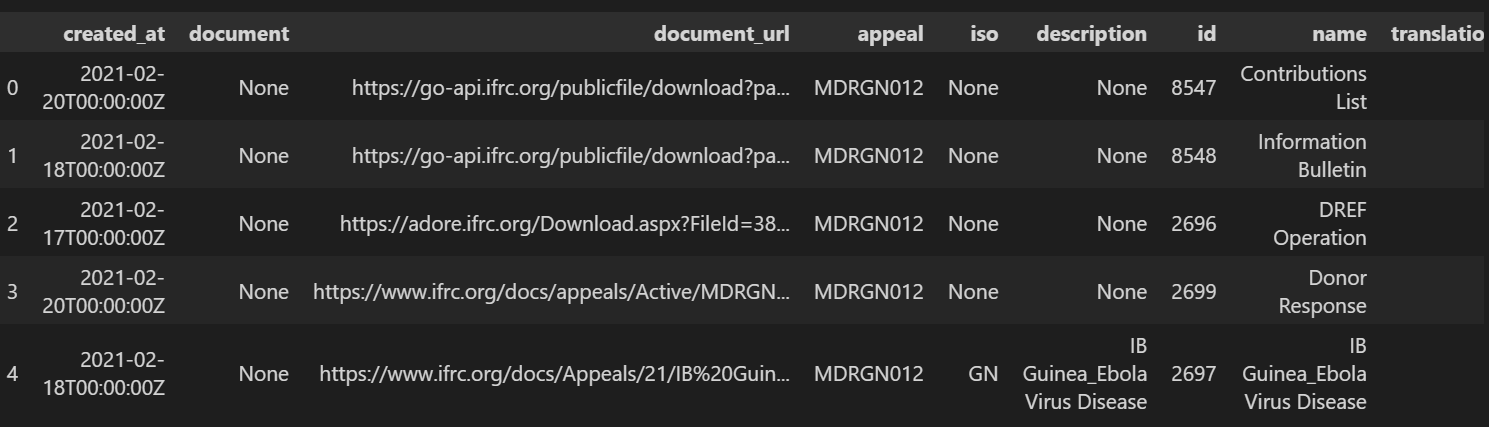
print(appeal_documents_df)As a result of running the above code, the data would appear in a table as shown below. The column named documents_url contains the URLs of the appeal documents allowing the user to download the pdf of the specific document.